Table of Contents
- Introduction
- What Is a Fly Cutter?
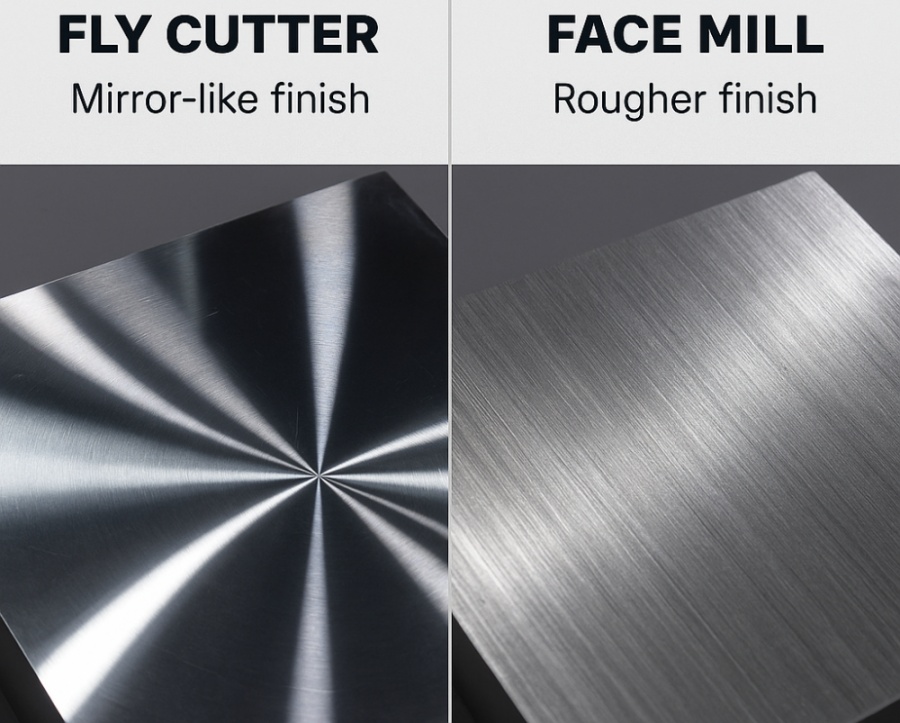
- Fly Cutter vs Face Mill
- When to Choose a Fly Cutter
- Types of Drilling Related to Milling
- Horizontal Mill Tooling: The Ideal Partner
- Tips for Using a Fly Cutter Effectively
- Common Problems and How to Avoid Them
- Applications in Precision Manufacturing
- Conclusion
Introduction
When it comes to surface finishing in CNC milling, few tools capture the machinist’s imagination quite like the fly cutter. Known for producing mirror-like finishes on large, flat surfaces, the fly cutter bridges the gap between traditional single-point machining and modern multi-insert milling.
In this guide, we’ll explore how a fly cutter for mill works, compare it with a face mill, discuss types of drilling that complement surface operations, and explain the advantages of horizontal mill tooling for precision manufacturing.
What Is a Fly Cutter?
A fly cutter is a single-point cutting tool mounted in a milling machine spindle. Unlike multi-insert face mills that use multiple teeth, a fly cutter has only one cutting edge that sweeps across the workpiece in a circular path.
Because the same edge makes each successive pass, surface irregularities are minimized, leading to exceptional surface smoothness. Fly cutters are especially useful for materials like aluminum, brass, and mild steel, where surface finish matters more than material removal rate.
Key Components
- Tool body: Holds the cutting bit or insert.
- Cutting tool: Usually a carbide insert or high-speed steel bit.
- Adjustment screw: Allows precise control over cutting diameter and depth.
Fly Cutter vs Face Mill
While both tools are designed for surfacing, their performance characteristics differ significantly.
Feature
Fly Cutter
Face Mill
Cutting Edges
Single cutting edge
Multiple inserts
Finish Quality
Excellent (mirror-like)
Good to very good
Feed Rate
Slow
Faster
Tool Cost
Low
Higher
Maintenance
Simple sharpening
Requires insert replacement
Ideal Use
Finishing large flat surfaces
Roughing and semi-finishing
A face mill excels at removing large amounts of material quickly, but a fly cutter produces the kind of finish that often eliminates the need for secondary grinding or polishing.
If your CNC operation prioritizes surface appearance or dimensional flatness, a properly balanced fly cutter can outperform multi-insert cutters at a fraction of the tooling cost.
When to Choose a Fly Cutter
You should select a fly cutter for milling when:
- You need flat, mirror-like surfaces on aluminum, brass, or copper parts.
- Dimensional accuracy and parallelism are critical (such as for sealing faces or molds).
- You’re working with low-volume prototypes where production speed is less important.
- Tool marks or chatter from multi-tooth cutters must be avoided.
However, avoid using fly cutters for hard steels or large batch production. The slower feed rate and single-point cutting nature make them less efficient for heavy removal operations.
Types of Drilling Related to Milling
Although drilling and milling are distinct processes, they often occur on the same CNC setup. Understanding the types of drilling helps machinists choose appropriate tool paths before or after surfacing with a fly cutter.
1. Center Drilling
Used to create a starting point for accurate hole placement. Often performed before any milling to prevent tool wander.
2. Peck Drilling
Used for deep holes, where the drill periodically retracts to clear chips and reduce heat buildup.
3. Step Drilling
Combines multiple diameters in one operation, saving time for holes that require countersinks or shoulders.
4. Reaming and Boring
After drilling, reaming ensures diameter precision, while boring improves surface finish and concentricity — techniques that complement the finishing effect of a fly cutter.
5. Spot Facing
Creates a smooth, flat surface around a hole opening — essentially a miniature fly-cutting operation done locally around the hole.
By combining fly cutting for wide surfaces and drilling/reaming for holes, manufacturers achieve precise, fully machined parts ready for assembly.

Horizontal Mill Tooling: The Ideal Partner
In high-volume or heavy-duty operations, horizontal mills offer unique advantages when paired with fly cutters or face mills.
Advantages of Horizontal Milling
- Superior Chip Evacuation — Gravity assists chip removal, preventing recutting and heat damage.
- Rigid Workholding — Clamping on multiple sides ensures stability during deep cuts.
- Multiple Tool Mounting — Tool arms and pallets allow multiple fly cutters or face mills for batch processing.
- Enhanced Surface Consistency — The horizontal axis helps maintain parallelism and minimizes vibration.
When a horizontal mill is equipped with precision fly cutter tooling, it becomes a surface-finishing powerhouse, capable of producing large, flat components with repeatable accuracy.
Tips for Using a Fly Cutter Effectively
- Balance the Cutter Properly
An unbalanced tool causes chatter and poor finishes. Always check dynamic balance before operation. - Use Correct Feed and Speed
For aluminum, start around 800–1000 SFPM with light feed (0.002–0.004 inch per revolution).
For steel, use 300–400 SFPM with minimal depth of cut. - Inspect Tool Sharpness
A dull edge increases cutting forces and leads to tool marks. - Apply Lubrication
Light mist coolant or cutting oil reduces friction and improves surface shine. - Optimize Step-Over
Overlapping each pass by 30–40 % ensures uniform finish and prevents ridges.
Common Problems and How to Avoid Them
Problem
Cause
Solution
Chatter marks
Unbalanced cutter or loose workholding
Re-balance tool, check vise clamps
Poor surface finish
Incorrect feed/speed or dull tool
Adjust RPM, resharpen cutting edge
Tool deflection
Excessive depth of cut
Reduce DOC or increase rigidity
Overheating
No coolant or high speed
Apply coolant, reduce spindle speed
Regular maintenance of the spindle and collet system also ensures consistent results and prolongs tool life.
Applications in Precision Manufacturing
Fly cutters are used in:
- Die and mold finishing
- Aerospace panel surfacing
- Automotive sealing faces
- Custom aluminum plate finishing
- Prototype flat parts
In each case, the goal is the same — achieve tight flatness tolerances and a high-gloss appearance without secondary grinding.
Conclusion
A fly cutter for mill remains one of the simplest yet most effective tools in the machinist’s arsenal. It provides unmatched surface finish at low cost, complements drilling and reaming operations, and pairs beautifully with horizontal mill setups for superior precision.
By understanding the differences between fly cutter vs face mill, mastering types of drilling, and optimizing your horizontal mill tooling, you can dramatically improve both surface quality and machining efficiency.
Looking for precision CNC machining services?
Custom CNC machining by Huade Precision Manufacturing — Request your quote today.
/* Need to check and remove the input variables related to the Style Tab. */ .srfm-form-container-1218 { /* New test variables */ —srfm-color-scheme-primary: var(—ast-global-color-0); —srfm-color-scheme-text-on-primary: #FFFFFF; —srfm-color-scheme-text: var(—ast-global-color-2); —srfm-quill-editor-color: var(—ast-global-color-0); —srfm-color-input-label: var(—ast-global-color-2); —srfm-color-input-description: hsl( from var(—ast-global-color-2) h s l / 0.65 ); —srfm-color-input-placeholder: hsl( from var(—ast-global-color-2) h s l / 0.5 ); —srfm-color-input-text: var(—ast-global-color-2); —srfm-color-input-prefix: hsl( from var(—ast-global-color-2) h s l / 0.65 ); —srfm-color-input-background: hsl( from var(—ast-global-color-2) h s l / 0.02 ); —srfm-color-input-background-hover: hsl( from var(—ast-global-color-2) h s l / 0.05 ); —srfm-color-input-background-disabled: hsl( from var(—ast-global-color-2) h s l / 0.07 ); —srfm-color-input-border: hsl( from var(—ast-global-color-2) h s l / 0.25 ); —srfm-color-input-border-disabled: hsl( from var(—ast-global-color-2) h s l / 0.15 ); —srfm-color-multi-choice-svg: hsl( from var(—ast-global-color-2) h s l / 0.7 ); —srfm-color-input-border-hover: hsl( from var(—ast-global-color-0) h s l / 0.65 ); —srfm-color-input-border-focus-glow: hsl( from var(—ast-global-color-0) h s l / 0.15 ); —srfm-color-input-selected: hsl( from var(—ast-global-color-0) h s l / 0.1 ); —srfm-btn-color-hover: hsl( from var(—ast-global-color-0) h s l / 0.9 ); —srfm-btn-color-disabled: hsl( from var(—ast-global-color-0) h s l / 0.25 ); /* Dropdown Variables */ —srfm-dropdown-input-background-hover: hsl( from var(—ast-global-color-2) h s l / 0.05 ); —srfm-dropdown-option-background-hover: hsl( from var(—ast-global-color-2) h s l / 0.10 ); —srfm-dropdown-option-background-selected: hsl( from var(—ast-global-color-2) h s l / 0.05 ); —srfm-dropdown-option-selected-icon: hsl( from var(—ast-global-color-2) h s l / 0.65 ); —srfm-dropdown-option-text-color: hsl( from var(—ast-global-color-2) h s l / 0.80 ); —srfm-dropdown-option-selected-text: var(—ast-global-color-2); —srfm-dropdown-badge-background: hsl( from var(—ast-global-color-2) h s l / 0.05 ); —srfm-dropdown-badge-background-hover: hsl( from var(—ast-global-color-2) h s l / 0.10 ); —srfm-dropdown-menu-border-color: hsl( from var(—ast-global-color-2) h s l / 0.10 ); —srfm-dropdown-placeholder-color: hsl( from var(—ast-global-color-2) h s l / 0.50 ); —srfm-dropdown-icon-color: hsl( from var(—ast-global-color-2) h s l / 0.65 ); —srfm-dropdown-icon-disabled: hsl( from var(—ast-global-color-2) h s l / 0.25 ); /* Background Control Variables */ —srfm-instant-form-padding-top: 32px;—srfm-instant-form-padding-right: 32px;—srfm-instant-form-padding-bottom: 32px;—srfm-instant-form-padding-left: 32px;—srfm-instant-form-border-radius-top: 12px;—srfm-instant-form-border-radius-right: 12px;—srfm-instant-form-border-radius-bottom: 12px;—srfm-instant-form-border-radius-left: 12px;—srfm-form-padding-top: 0px;—srfm-form-padding-right: 0px;—srfm-form-padding-bottom: 0px;—srfm-form-padding-left: 0px;—srfm-form-border-radius-top: 0px;—srfm-form-border-radius-right: 0px;—srfm-form-border-radius-bottom: 0px;—srfm-form-border-radius-left: 0px;—srfm-bg-color: #ffffff;—srfm-bg-overlay-opacity: 1; —srfm-row-gap-between-blocks: 18px;—srfm-address-label-font-size: 16px;—srfm-address-label-line-height: 24px;—srfm-address-description-font-size: 14px;—srfm-address-description-line-height: 20px;—srfm-col-gap-between-fields: 16px;—srfm-row-gap-between-fields: 16px;—srfm-gap-below-address-label: 14px;—srfm-dropdown-font-size: 14px;—srfm-dropdown-gap-between-input-menu: 4px;—srfm-dropdown-badge-padding: 2px 6px;—srfm-dropdown-multiselect-font-size: 12px;—srfm-dropdown-multiselect-line-height: 16px;—srfm-dropdown-padding-right: 12px;—srfm-dropdown-padding-right-icon: calc( var( —srfm-dropdown-padding-right ) + 20px );—srfm-dropdown-multiselect-padding: 8px var( —srfm-dropdown-padding-right-icon ) 8px 8px;—srfm-input-height: 44px;—srfm-input-field-padding: 10px 12px;—srfm-input-field-font-size: 16px;—srfm-input-field-line-height: 24px;—srfm-input-field-margin-top: 6px;—srfm-input-field-margin-bottom: 6px;—srfm-checkbox-label-font-size: 16px;—srfm-checkbox-label-line-height: 24px;—srfm-checkbox-description-font-size: 14px;—srfm-checkbox-description-line-height: 20px;—srfm-check-ctn-width: 16px;—srfm-check-ctn-height: 16px;—srfm-check-svg-size: 10px;—srfm-checkbox-margin-top-frontend: 4px;—srfm-checkbox-margin-top-editor: 6px;—srfm-check-gap: 8px;—srfm-checkbox-description-margin-left: 24px;—srfm-flag-section-padding: 10px 0 10px 12px;—srfm-gap-between-icon-text: 8px;—srfm-label-font-size: 16px;—srfm-label-line-height: 24px;—srfm-description-font-size: 14px;—srfm-description-line-height: 20px;—srfm-btn-padding: 10px 14px;—srfm-btn-font-size: 16px;—srfm-btn-line-height: 24px;—srfm-multi-choice-horizontal-padding: 20px;—srfm-multi-choice-vertical-padding: 20px;—srfm-multi-choice-internal-option-gap: 8px;—srfm-multi-choice-vertical-svg-size: 40px;—srfm-multi-choice-horizontal-image-size: 24px;—srfm-multi-choice-vertical-image-size: 120px;—srfm-multi-choice-outer-padding: 2px; }
There was an error trying to submit your form. Please try again.
Your Name *
This field is required.
Your Email *
This field is required.
Phone Number
Your phone number (optional)
This field is required.
Company Name
Your company name (optional)
This field is required.
Project Details / Requirements *
Please include material, quantity, tolerance, dimensions, or any specific requirements.
This field is required.
SEND MESSAGE
There was an error trying to submit your form. Please try again.